NAS List
All entries
The possible options for your NAS include:
-
AccessPoints such as Meraki, OpenWiFi and Cisco (for Meraki guest Wi-Fi, see Meraki guest Wi-Fi);
-
Routers like Cisco, Mikrotik Router Board, pfSense, OpenWRT;
-
GGSN or PGW.
-
The AAAs from your MSO (if applicable)
-
SpherAAA as client: Your partner's AAA servers.
There is no default NAS configuration included.
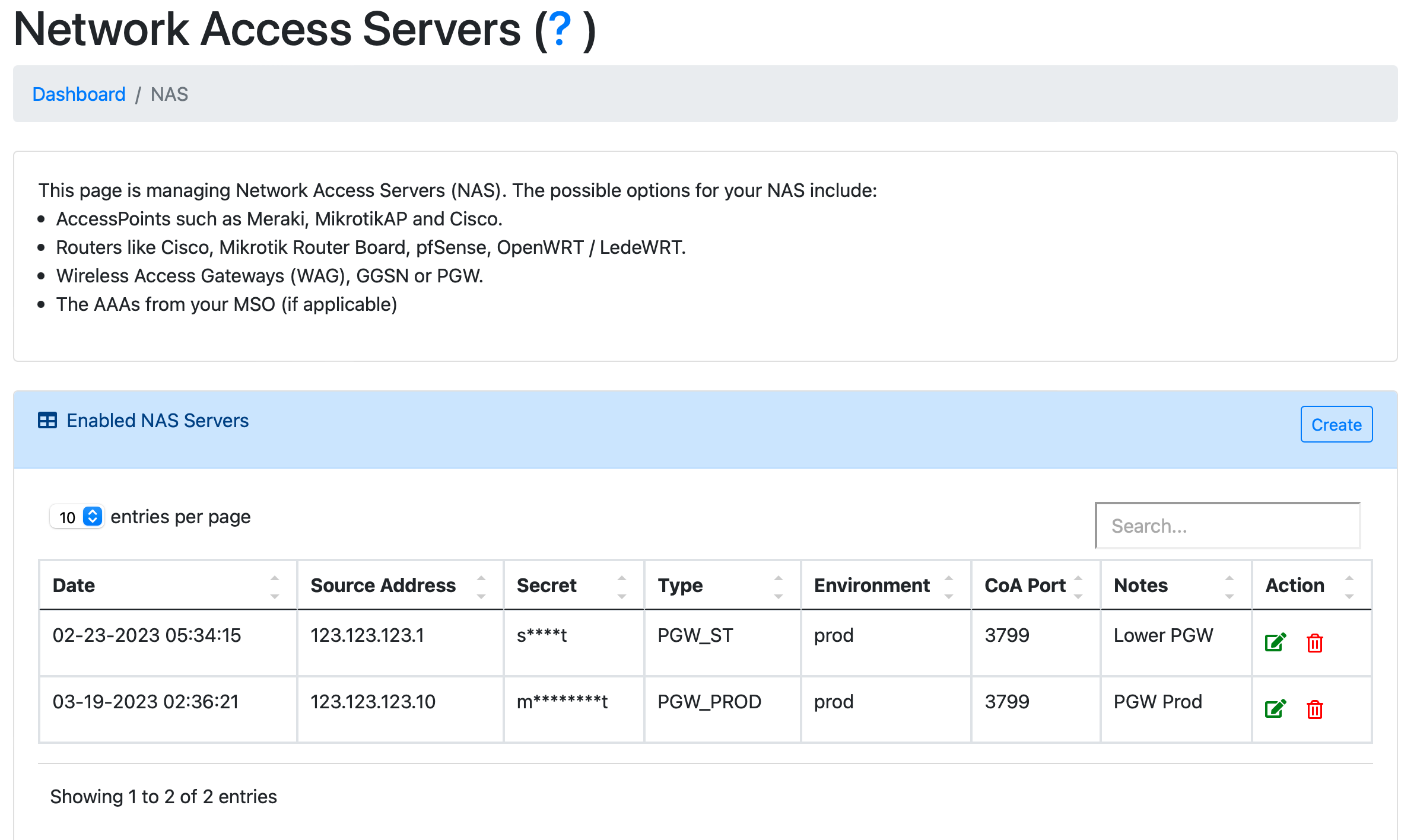
Click to Configuration > NAS
SpherAAA RADIUS endpoint details
The NAS page shows the IP address, Authentication Port, Accounting Port and RADSEC Port that SpherAAA listens on. Use these values when you configure a NAS client or upstream AAA server to talk to SpherAAA.
MSP AAA servers
If your account is a Managed Service Provider (MSP), a separate "MSP AAA Servers" table lists the AAA servers shared across your MSP, with source address, type, environment and notes. These entries are managed by the MSP and are read-only on this page.
Enabled RADIUS clients and servers
The main table lists every configured NAS and upstream AAA server, with source/destination address, protocol, port, secret, type, environment, status and notes. Entries marked "Server" proxy or forward requests to an upstream AAA server; entries marked "Server/Client" are regular NAS clients.
The Status column shows the result of SpherAAA's health check for that entry (OK, or an error) when available.
Dynamic or changing NAS IP addresses
Plain UDP RADIUS identifies a NAS by its source IP address (or CIDR range) - if your NAS's public IP changes (a residential/dynamic ISP connection, a device behind a DHCP-assigned address, etc.), requests from it will start getting rejected as soon as the address no longer matches what's registered here, since SpherAAA has no other way to recognize it.
If your NAS's IP isn't stable, switch that entry's Protocol to RADSEC instead. RadSec identifies a client by its SpherAAA-generated client certificate, not its source IP, so the entry keeps working no matter how often the NAS's address changes - there's nothing to update when the IP moves. This doesn't apply to clients using certificates from your own imported CA, which are still matched by IP address. See the Protocol/certificate fields below, and RADSEC Servers for certificate management.
Adding new entry
After clicking to Create, pick a NAS Role first - it changes which fields the rest of the form shows:
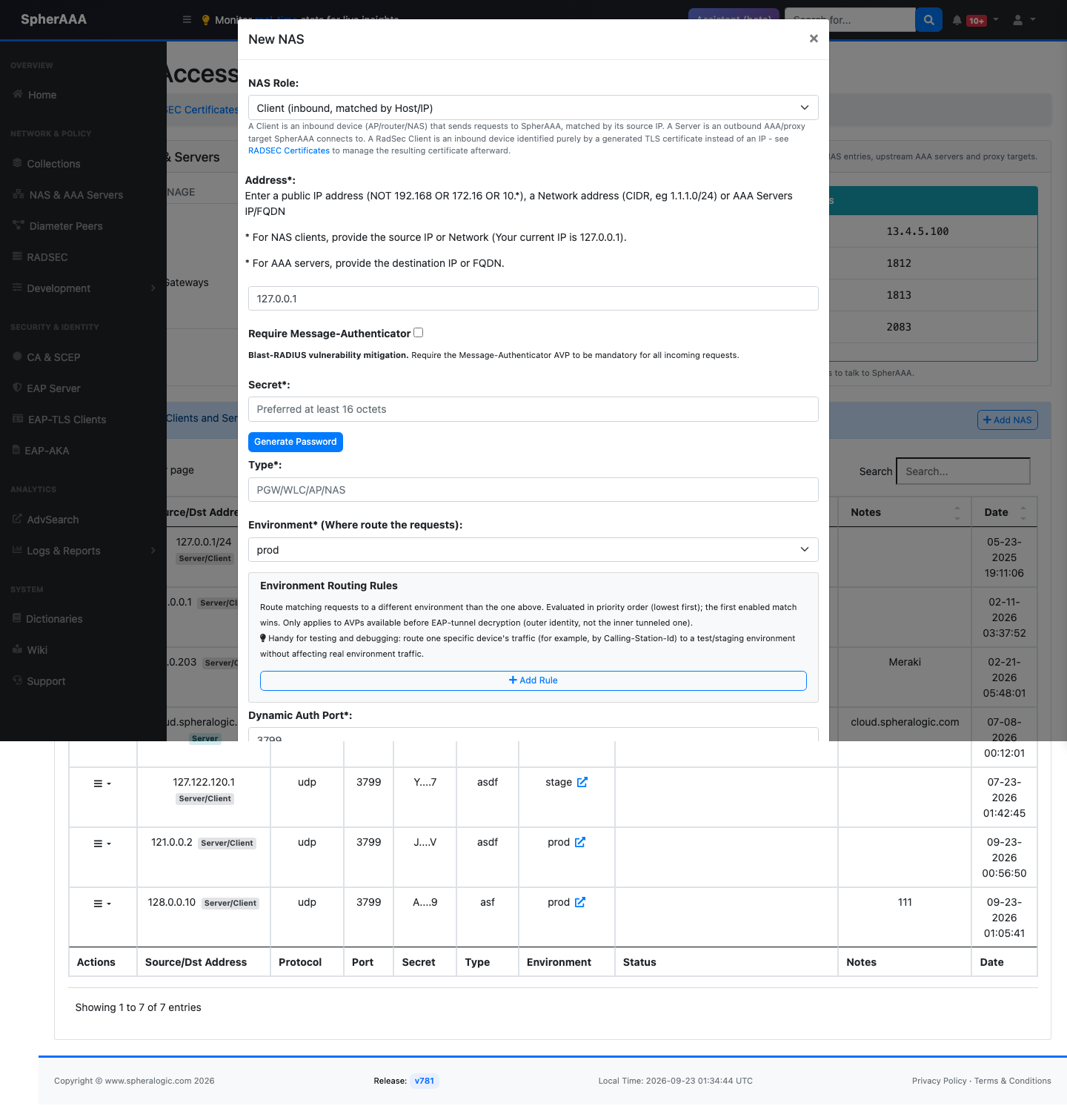
- Client (inbound, matched by Host/IP): the default - a regular NAS entry identified by its source IP, as described throughout this page.
- Server (outbound AAA target): this entry proxies or forwards requests to an upstream AAA server, the same as the old "Mark as RADIUS Server" checkbox used to enable.
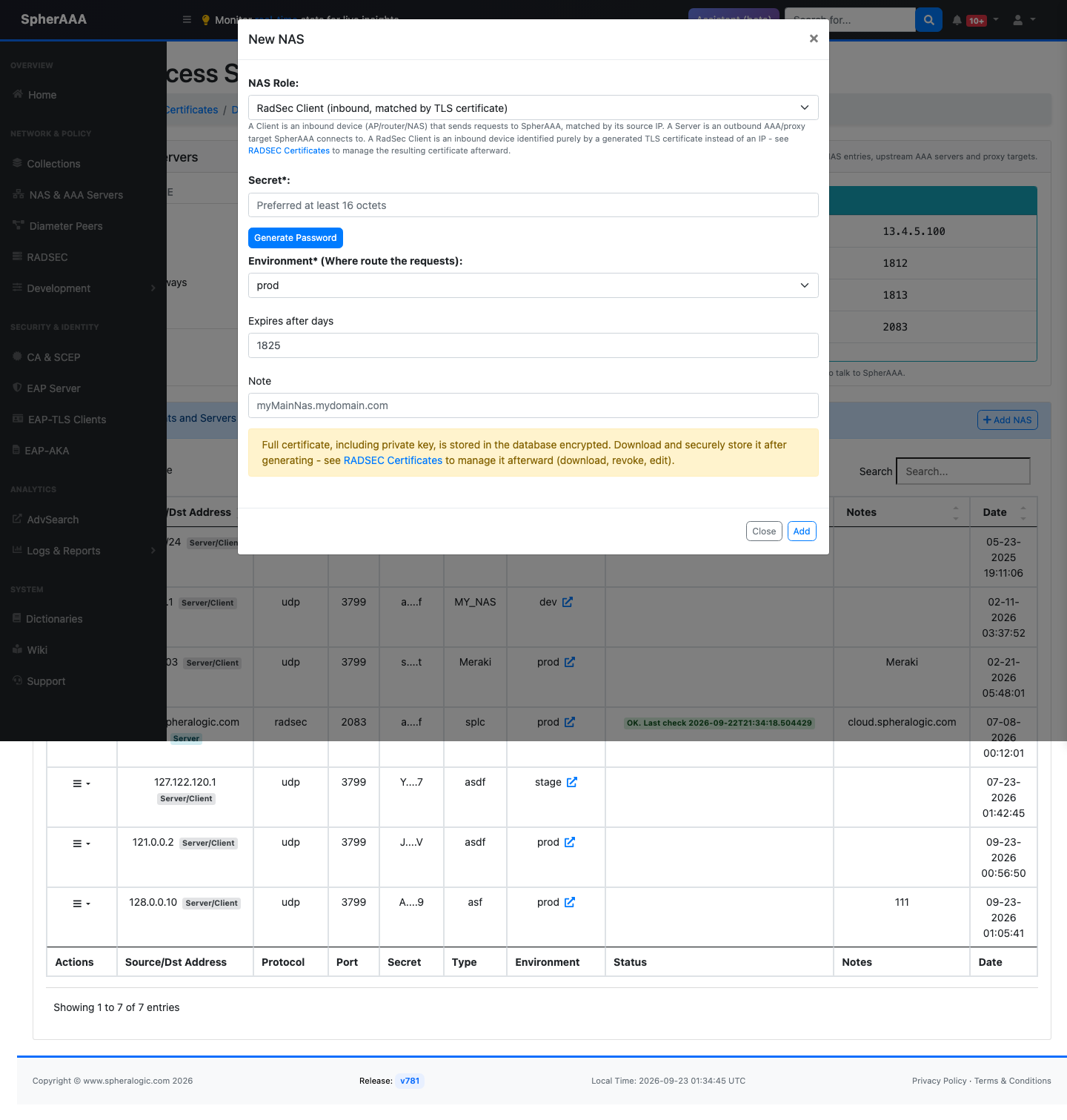
- RadSec Client (inbound, matched by TLS certificate): a convenience shortcut to generate a RADSEC client certificate right from this modal, instead of visiting the RADSEC Certificates page separately. Just fill in Secret, Environment, Expires after days, and a Note, then submit - the full certificate (including the private key) is stored encrypted, and you're taken to the RADSEC Certificates page afterward to download and manage it.
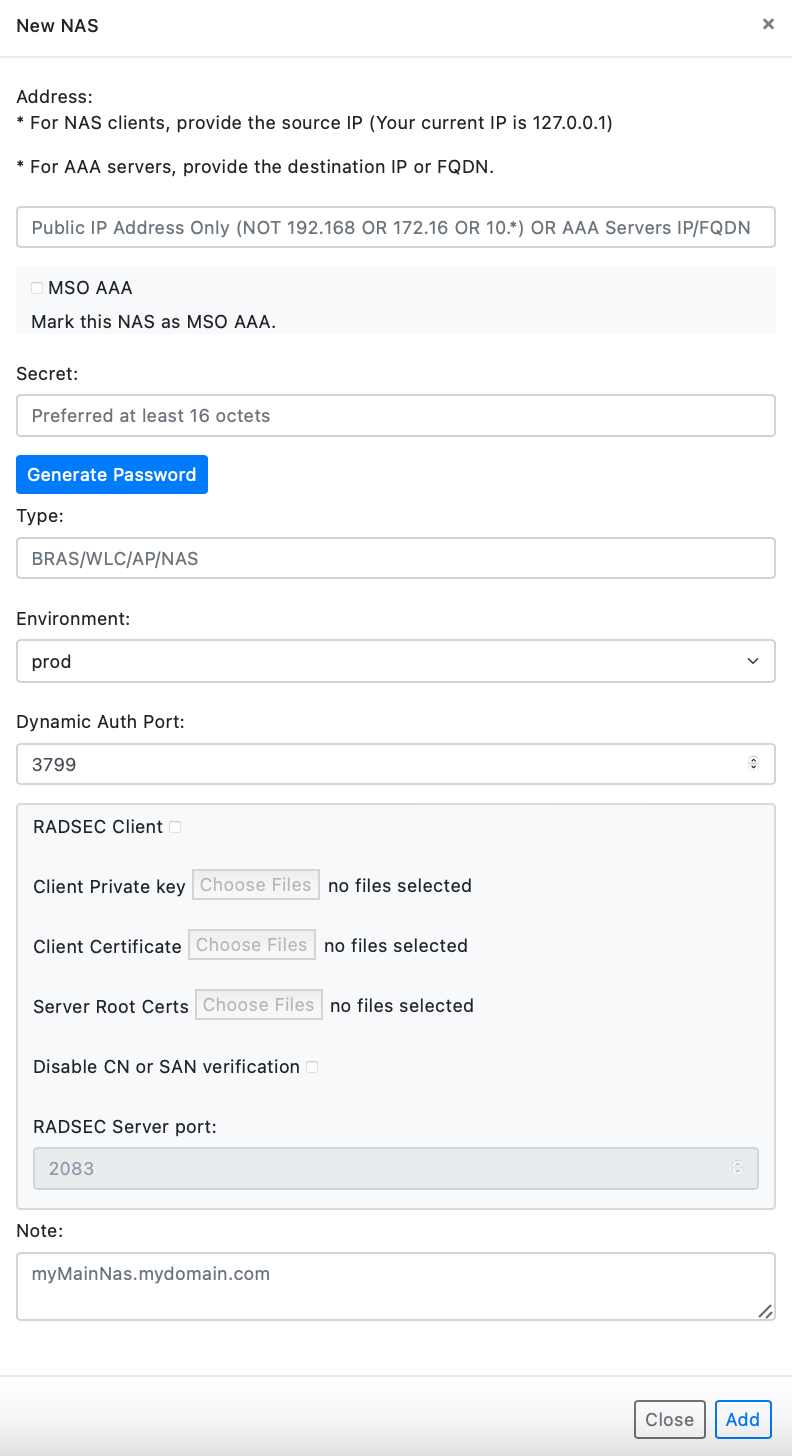
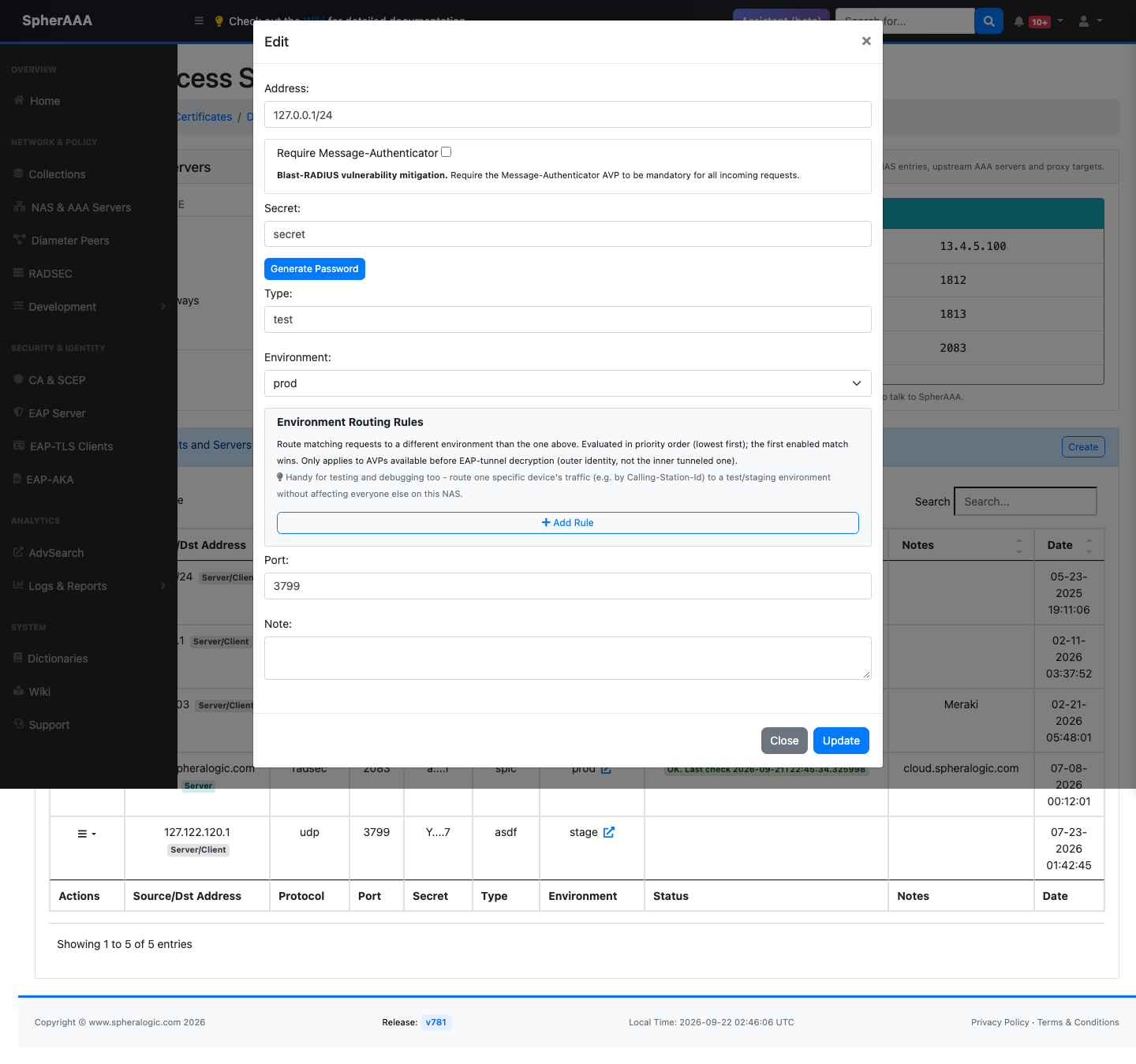
For Client (Host/IP) and Server roles, fill in these fields:
-
IP Address:Enter a public IP address (NOT 192.168 OR 172.16 OR 10.*), a Network address (CIDR, eg 1.1.1.0/24) or AAA Servers IP/FQDN. For NAS clients, use the source IP or network. For AAA servers, use the destination IP or FQDN. -
MSP AAA:(MSP accounts only) Mark this entry as an MSP AAA server. When enabled, you can set a regular expression to route requests by NAI realm (for example(.*)@(.*)), and test it against a sample realm before saving. -
Require Message-Authenticator:Requires the Message-Authenticator attribute on all incoming requests from this NAS. This mitigates the Blast-RADIUS vulnerability. -
Secret:Transactions between the client and RADIUS server are authenticated through the use of a shared secret, which is never sent over the network. Use "Generate Password" to create a random secret of at least 16 octets. -
Type:Type can be used to group / classify NAS's into sub-groups. Like NAS-Type might be ResidentialAp, CafeAp, OutdoorAP, Hotspot, WLC, BRAS etc. This variable is accessible on PolicyLogic viaradius.nas['Type']. -
Environment:This Network Access Server (NAS) will utilize the assigned environment, including PolicyLogic and EAP certificates. -
DM / CoA Port:RADIUS DM (Disconnect Message) and RADIUS CoA (Change of Authorization) is a feature that allows a RADIUS server to adjust an active client session. Default port is 3799 -
Protocol:(Server role only) The transport protocol for this server: UDP, TCP or RADSEC. -
Previously Imported Certificates:For RADSEC Servers, use previously imported certificates. Manage it using RADSEC Servers -
Client Private Key:Private key file for RADSEC Client. -
Client Certificate:Certificate file. -
Server Root certificate:CA Certificate for RADSEC server. -
Disable CN or SAN verificationDo not validate the RADSEC server's CN or SAN with the server's IP or FQDN. -
RADSEC Port:RADSEC Server port. -
Note:Add description for your NAS.
Click to submit to save your changes. Adding, editing, or removing a NAS entry shows a brief notice that the change can take up to 30 seconds to actually take effect.
Note: If you getting "Conflict NAS IP Address" error, that means you are not using public IP address of your NAS or this IP is already registered
After adding your first NAS details, you can continue configuration on your actual NAS hardware/software.
When you done on integration on your NAS, you can start adding your new users
Environment routing rules
By default, every request from a NAS is handled by the environment set on that NAS's Environment field. Environment routing rules let you override that on a per-request basis for a specific NAS, without creating a separate NAS entry.
On the NAS add/edit page, add one or more rules, each matching an incoming request attribute against a condition, for example "if Calling-Station-Id matches X" or "if User-Name matches Y." When an incoming request matches a rule, it's routed to that rule's chosen environment (Dev/Test/Stage/Prod, or a configured Proxy environment) instead of the NAS's default. Rules are useful for testing changes against a subset of traffic, or splitting different devices/users on the same NAS across environments, without standing up a duplicate NAS entry just to point it somewhere else.
Diameter connections (for HSS/carrier-network integrations such as EAP-AKA) are configured separately - see Diameter.